What Is a Hardware Wallet? Cold Storage Explained Simply
A plain-English explanation of hardware wallets - what they store, why cold storage beats a hot wallet, what a secure element does, and when you actually need one.
A hardware wallet is a small dedicated computer whose only job is to hold private keys and sign transactions with them, without ever revealing them - not to your laptop, not to the internet, not even to you unless you ask for the recovery phrase.
If you have ten minutes and no crypto background, this is the article to read before buying anything.
First: your crypto is not in a wallet#
This trips up everyone, so start here. Your coins live on a blockchain - a public ledger replicated across thousands of machines. They are not files, and they are not stored in any app.
What you own is a private key: a very large secret number. The blockchain's rules say that whoever can produce a valid signature from that key may move the associated coins. That is the entire ownership model.
So a "wallet" does not hold coins. It holds keys. When you hear "not your keys, not your coins," this is what it means: if an exchange holds the key, the exchange owns the coins and you own a promise.
Hot wallets versus cold wallets#
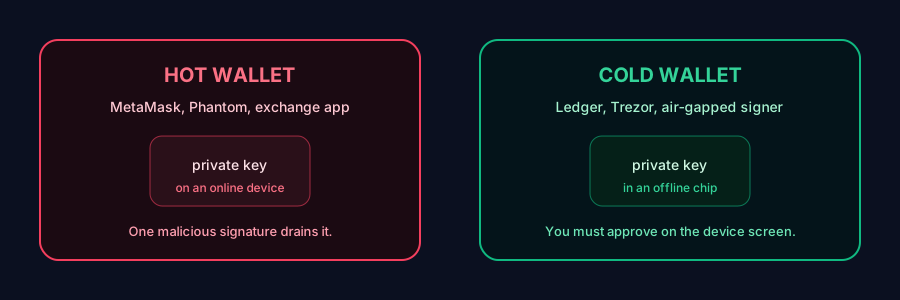
A hot wallet - MetaMask, Phantom, Trust Wallet, an exchange app - stores your key on an internet-connected device. It is fast, free and convenient. It is also one piece of malware, one malicious browser extension, or one leaked cloud backup away from total loss.
A cold wallet keeps the key on a device that never exposes it. Signing happens inside the chip. The USB cable carries transactions in and signatures out; the key stays put.
| Hot wallet | Hardware wallet | |
|---|---|---|
| Key location | On an online phone or PC | Inside an offline secure chip |
| Survives malware on your PC | No | Yes |
| Cost | Free | ~$79 and up |
| Convenience | Instant | Plug in, press buttons |
| Right for | Small, active balances | Savings you intend to keep |
Most experienced holders run both: a hot wallet with pocket money for daily use, and a hardware wallet holding the amount they would be sick about losing.
How signing actually works#
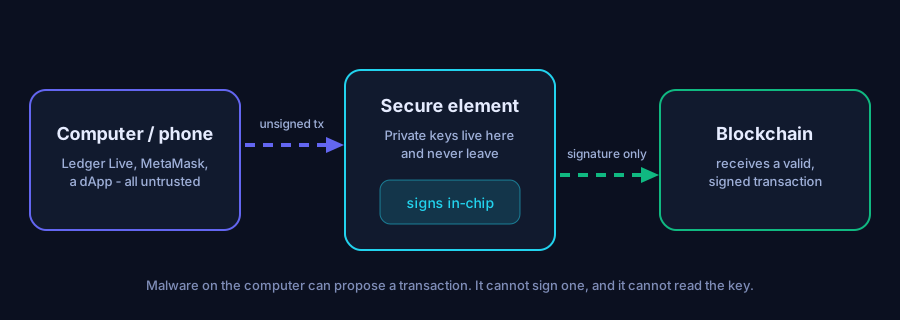
- You build a transaction in wallet software on your computer.
- The unsigned transaction is sent to the hardware wallet.
- The device displays the details on its own screen - amount, destination, network.
- You physically press buttons to approve.
- The secure element signs inside the chip.
- Only the signature returns to the computer, which broadcasts it.
Two properties fall out of this, and both matter:
- Extraction resistance. Malware cannot read a key that never leaves the chip.
- Trusted display. Malware can lie to you on your monitor, but it cannot repaint the device's screen. That is why "verify the address on the device" is repeated everywhere - it is the only display in the chain you can trust.
What a secure element is#
A secure element is a tamper-resistant chip designed to guard secrets under physical attack: probing, power analysis, fault injection, decapsulation. The same class of chip sits in your passport, your SIM and your bank card. They carry independent certifications - Common Criteria EAL5+ or EAL6+ - which describe how much lab effort an attacker must spend to break one.
Not all hardware wallets use one. Some use a general microcontroller, which is cheaper and fully auditable but has historically been vulnerable to voltage-glitching attacks that extract the seed from a physically stolen device. Trezor's older models were shown to be vulnerable this way by Kraken Security Labs in 2020, which is a large part of why Trezor's newer Safe line added a secure element.
The trade-off is real and unresolved: secure elements come with vendor NDAs, so firmware for them tends to be closed source. You are choosing between auditable but physically softer and physically hardened but not fully auditable. Neither answer is wrong. See Ledger vs Trezor for the specifics.
The recovery phrase is the actual wallet#
When you set up a hardware wallet it generates 12 or 24 words - a BIP39 recovery phrase - that encode the master seed all your keys derive from.
- Lose the device? Buy another, enter the words, everything comes back.
- Lose the words and the device? The funds are unreachable forever.
- Someone else reads the words? They have your funds, no device required.
The physical device is disposable. The words are not. Read the recovery phrase guide before you put real money behind one.
What a hardware wallet does not protect you from#
This is where people get hurt, so be clear-eyed:
- You approving a malicious transaction. The device signs what you tell it to. Drainers work fine against hardware wallets.
- Phishing your recovery phrase. No chip stops you from typing 24 words into a website.
- Losing your backup. That is a filing problem, not a security problem, and it destroys more coins than hackers do.
- Physical coercion. A passphrase-protected decoy wallet is the partial answer.
- You sending to the wrong address. Verify on the device.
A hardware wallet converts "any malware can take everything" into "only my own approvals can." That is a huge improvement, and it is not immunity.
Do you actually need one?#
Rough guidance, not financial advice:
- Under a few hundred dollars: a reputable mobile wallet with the seed written on paper is proportionate.
- A few hundred to a few thousand: buy one. The cheapest current-generation device is cryptographically identical to the flagship.
- Serious money, or a business: hardware wallet plus a passphrase, and above roughly the price of a car, consider multisig across two vendors so no single device or firmware can move funds alone.
The trigger is simple: if losing the balance would genuinely damage you, the key should not live on a machine that browses the web.
Choosing one#
Look for, in order:
- A real secure element, or a clear-eyed acceptance of why one is absent.
- A screen big enough to read what you are signing. Blind signing is where DeFi users get drained.
- BIP39 standard recovery, so you are never locked to one vendor.
- A firmware track record - years of updates, and a public response when things go wrong.
- Direct purchase, never a marketplace.
Our starting recommendation for most people is the Ledger Nano S Plus; if open firmware matters more to you than physical hardening, a Trezor Safe is the right call instead.
FAQ#
What is a hardware wallet in simple terms?#
A small offline device that stores the secret keys to your crypto and signs transactions internally, so the keys never touch your computer or the internet.
Do I still own my crypto if my hardware wallet breaks?#
Yes. The coins are on the blockchain and your access is derived from your recovery phrase. Buy a replacement, restore the phrase, and your balances reappear.
Is a hardware wallet 100% safe?#
No. It near-eliminates key theft by malware, but it cannot stop you from approving a malicious transaction, being phished for your recovery phrase, or losing your backup. Those remain your responsibility.
Hot wallet or cold wallet - which should I use?#
Both. Keep a small spending balance in a hot wallet for daily use, and hold savings on a hardware wallet. Never use your cold wallet for experimental mints or airdrop claims.
How much crypto justifies a hardware wallet?#
If losing the balance would genuinely hurt, it justifies one. Practically, most people should buy at somewhere between a few hundred and a couple of thousand dollars of holdings.
Disclosure. Some links on this site may be affiliate links. If you buy through them we may earn a commission at no extra cost to you. It never changes our verdict — we say when a product is a bad fit. Vaultwise is an independent publication. We are not affiliated with, endorsed by, or sponsored by Ledger SAS, Trezor/SatoshiLabs, or any wallet manufacturer. Product names and trademarks belong to their respective owners.
Keep reading
Ledger Hardware Wallet Review 2026 - Is It Still Worth Buying?
A full, independent review of the Ledger hardware wallet range - how the secure element actually protects you, what the 2020 breach and Ledger Recover really changed, and who should buy which model.
Targets: ledger hardware wallet review

How to Set Up a Ledger Wallet - Complete Step-by-Step Guide
Set up a new Ledger Nano, Flex or Stax correctly the first time - unboxing checks, PIN, the 24 words, genuine-device verification, and the first transfer test that catches mistakes before they cost you.
Targets: how to set up a ledger wallet
Where to Buy a Ledger Safely (and Why Never From Amazon)
Buying a hardware wallet is a supply-chain decision. Where to buy, how to check a device is genuine, why marketplace listings are dangerous, and what to do if yours arrived from a reseller.
Targets: where to buy a ledger wallet safely
Get the self-custody checklist
One email a month: new scam patterns, firmware notes worth reading, and the mistakes that actually cost people money. No token shilling, ever.
Replace the form action with your own Formspree / ConvertKit / Buttondown endpoint in src/layout.mjs.